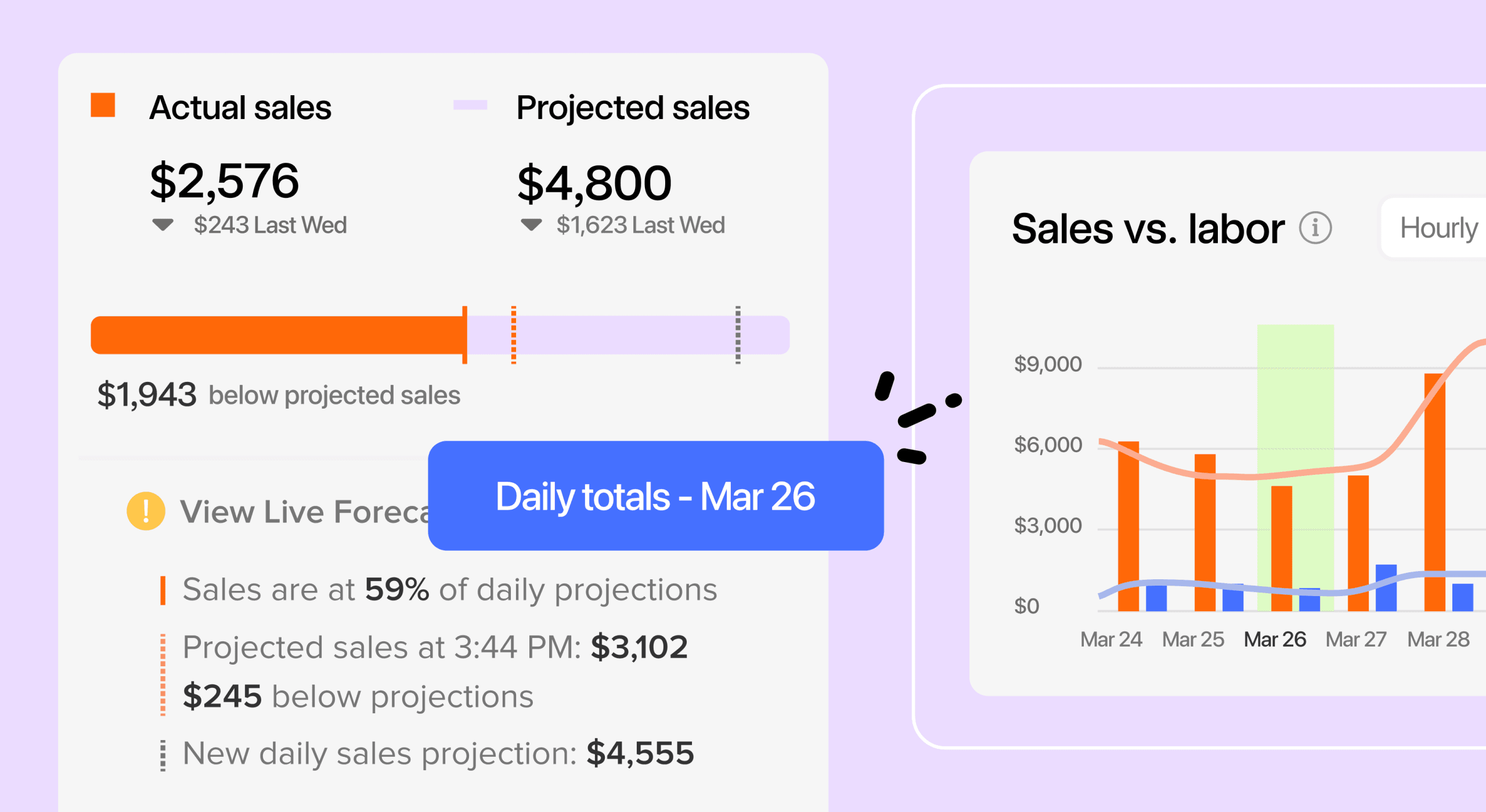
Your SpotOn point of sale (POS) rings up every smoothie. A POS is the register and software that records each sale, tip, and clock-in. But if your schedules and payroll can’t see that data, managers end up guessing at staffing for the rush.
Here’s why we think 7shifts is the best HR software for juice and smoothie franchises using SpotOn. It connects your sales, punches, tips, and team in one restaurant HR platform, so every labor dollar works harder.
Why 7shifts is the best HR software for juice and smoothie franchises on SpotOn
In our view, 7shifts is the best fit because it connects directly to SpotOn POS and pulls Net sales in real time. It turns those sales into AI-powered forecasts, then brings punches, card and cash tips, employee profiles, and wages into one restaurant HR platform across every unit. AI-powered forecasts are sales projections built from your SpotOn history, so you can schedule to expected demand.
The POS is the right place to start. “Point of sale is the thing that’s running the restaurant, especially on the floor. It’s the source of truth for what sales happen and when, when someone is clocking in and out, and the tips made during that time,” says Julianne Lee, senior product manager at 7shifts.
Here’s what that gives a juice franchise:
- Live sales: Net sales sync in real time, on by default.
- Forecasts from your history: 7shifts imports up to 90 days of SpotOn sales history.
- Counter tips in one place: Card and cash tips come over with labor data, ready for tip calculations and payroll.
- Less double entry: Employee Sync and Wage Sync bring profiles and pay rates over from SpotOn.
- Every unit in one view: Owners and ops leaders compare sales and labor across locations.
7shifts for juice bars adds side-work task lists for jobs like blender cleaning and ice. Crews also get team chat, and managers get a log book.
What juice and smoothie franchises need from an HR platform
Juice bars run as quick service restaurants (QSR), which means counter service and fast tickets. Add short rushes, young crews, and a franchisor playbook, and staffing gets tricky.
According to IBISWorld juice bar industry data, the revenue size of the Juice & Smoothie Bars industry in the United States is $4.6bn in 2026. Every smoothie franchise and juice bar franchise in that market wins on speed at the counter.
Staffing your busiest hours
Many juice bars see sales bunch up in a few busy windows. Your SpotOn sales by hour and by week show exactly when yours hit.
Overstaff the lull and you waste labor. Understaff the rush and you lose sales.
The NRA labor cost analysis found, “Among all limited-service respondents to the survey, salaries and wages (including benefits) represented a median of 31.7% of sales in 2024.” That’s a limited-service benchmark, so treat it as a rough check on your restaurant labor cost percentage.
“Without a connected point of sale, you won’t find your labor cost until much later. It could take multiple weeks before you realize, ‘Oh my gosh, I added too many people during a week when it was really slow on sales,’” Lee says. Labor forecasting software fixes that by tying each shift to expected sales from SpotOn.
Scheduling young, part-time crews
Restaurant crews skew young. Per the BLS summer youth employment report, “The youth labor force–16- to 24-year-olds working or actively looking for work–grows sharply between April and July each year.”
The BLS food service worker profile states, “Food and beverage serving and related workers employs more 16- to 19-year-olds than any other occupation.” The NRA employee demographics brief reports that “64% of food preparation and counter workers and 52% of waitstaff are under the age of 25.”
With the 7shifts mobile scheduling app, staff can see and swap upcoming shifts, communicate with the team, and submit availability and time-off requests from their phones. Managers then review those changes in one place.
Some places, like Oregon, have predictive scheduling laws that require advance notice of schedules. These laws can reach large food service employers, including chains. The Oregon predictive scheduling rules tell covered workers, “Your employer must give you a work schedule in writing at least 14 calendar days in advance.”
In New York City, the NYC Fair Workweek fast food rules say covered employers “Must give workers work schedules 14 days in advance of the start of the schedule.” This isn’t legal advice. Check the rules in each city and state where you operate.
Running every unit the same way
Franchisors expect one playbook across the brand. But each new unit adds a schedule, a team, and local rules.
Turnover makes it harder. According to BLS JOLTS quits rates, accommodation and food services had an average monthly quits rate of 4.2% in 2025, compared with 2.0% for all industries. That sector includes hotels as well as restaurants.
With that much churn, new managers need to ramp fast. The same setup at every store makes it easy to schedule, track time, and run payroll.
How the 7shifts and SpotOn POS integration works
The SpotOn integration with 7shifts is direct, so sales and labor data move without manual exports. Here’s what connects.
Lee describes how sales data moves: “7shifts is in the middle of this relationship. The point of sale sends the information over to 7shifts, and we take that sales data and the labor information to look at who is working on what days and help optimize overall labor against the sales that are actually happening.”
| What connects | What it does | Good to know |
|---|---|---|
| Net sales | Syncs sales from SpotOn in real time | On by default |
| Sales history | Imports up to 90 days of past sales when you activate | The import may take a few hours |
| AI-powered forecasts | Projects future sales to guide your schedules | Needs about one to two weeks of data; SpotOn and 7shifts need the same time zone and a 5:00 a.m. to 5:00 a.m. workday |
| Actual labor | Pulls punches and labor costs; the Dashboard shows sales vs. labor | Turn it on under the Labor tab |
| Tips | Pulls card tips and cash tips alongside labor data | Set tip calculation settings after the first sync |
| Employee Sync | Creates 7shifts profiles from SpotOn | Syncs first and last name, Punch ID, email, inactive status, and location, department, and role |
| Wage Sync | Syncs wages from SpotOn pay rates | Turn it on per location in the Employee Data tab |
Mapping comes first
Mapping links each SpotOn employee and role to the right 7shifts profile. Mapping must be done before Employee Sync, Actual Labor, or Wage Sync.
7shifts auto-matches employees with identical names and spacing. Anyone left in Unmatched gets one of three choices: Match, Ignore, or Add.
Lee says this is where setups go sideways: “The most common thing operators get wrong is employee mapping. On the point of sale there could be an employee set up with one name, and in 7shifts they’ve also put in a middle name, so there are mishaps in making sure the right person is mapped.”
Make names identical in SpotOn POS and 7shifts. And keep salaried staff who don’t clock in on SpotOn in 7shifts, too.
Sales-driven schedules for the rush
Real-time Net sales give managers a live look at labor cost during the shift. They can spot a slow afternoon while there’s still time to adjust.
Forecasts help managers build next week’s schedule the same way. With sales-driven restaurant scheduling, they staff up for busy hours and lean out for slow ones.
That’s the job of good restaurant scheduling software. “Our schedule really shapes what labor costs will be, based on the information being pulled from our different partners,” Lee says.
2026 Labor Costs Playbook
Increase your bottom line with insights from over 500 restaurant pros—learn the true cost of employee turnover, the best way to manage labor costs, and proven strategies to protect profits.
Counter tips from SpotOn, handled in one place
Most juice bar tips come at the counter. SpotOn sends both card tips and cash tips to 7shifts alongside labor data.
After the first sync, set your tip calculation settings. That formula decides which tips count, how they’re calculated, and how they appear in reports and payroll exports.
Once tips are in 7shifts, you can manage them next to your schedule. It’s tip management software in the same place you build shifts.
For crews that share tips, 7shifts also offers automated tip pooling tools. “They can manage all of their tips in one single system,” Lee says.
The U.S. Department of Labor (DOL) oversees the Fair Labor Standards Act (FLSA), the main federal wage law. The DOL tipped employee fact sheet explains that “…the FLSA prohibits employers from keeping any portion of employees’ tips for any purpose, whether directly or through a tip pool.”
State laws can be stricter than federal rules. This isn’t legal advice, so check your state and local tip rules.
Built for multi-unit juice and smoothie franchises
Franchise owner-operators want one view of labor and sales across every unit. Ops directors want the same view to coach their operators.
7shifts multi-location management tools put every store in one place. “7shifts has the ability for an enterprise or corporation to see all of their labor costs in one single view,” Lee says.
One view of labor across every location
Compare sales and labor for each unit on the Dashboard. You’ll spot the store running heavy on labor before it eats into margin.
Wage Sync runs per location, so pay rate changes in SpotOn carry over to 7shifts. Your labor cost stays accurate without manual updates.
“Franchise owners don’t want to worry too much once everything is set up. They can go into 7shifts and see the labor forecast and the sales forecast to identify the best schedule to create,” Lee says.
New hires show up without double entry
New hires can join at any point in the year. Employee Sync auto-creates a 7shifts profile when you add someone in SpotOn.
Each profile pulls in first and last name, Punch ID, email, inactive status, and location, department, and role.
From punch to payroll
Punches, wages, and tips from SpotOn all land in 7shifts. Once your tip settings are configured, tips are included in 7shifts Payroll and external payroll exports.
7shifts restaurant payroll then turns those hours and tips into paychecks. It’s restaurant payroll software that starts with the same punches SpotOn recorded.
This needs mapping done and punch and wage data in place. Before you close a pay period, check the Warnings tab, your final checkpoint for issues like these:
- Missing punches
- Unmapped employees
- Role mismatches
Lee sees this as the full picture: “With payroll integrations, we can create a beautiful trifecta of a fully operational restaurant on a single tech stack: our point of sale, 7shifts managing HR information, and then pushing it over to payroll, whether that’s our own 7shifts Payroll or other partners.”
Proof from juice and smoothie operators
These are 7shifts platform results from juice franchises.
In our Clean Juice franchise case study, the brand had 75+ locations and a labor target of 22% to 25%. Three locations cut labor costs by an average of 8%, and locations hit weekly labor targets 75% to 80% of the time.
The Jamba franchisee playbook follows two operators with two California stores. They went from four platforms to two. Managers build schedules in 30 minutes to an hour, saving three to eight hours per week. Payroll takes one to two hours.
How to connect SpotOn to 7shifts
Setup is a team effort between you, SpotOn, and the 7shifts Integrations team. Before you start, make sure SpotOn and 7shifts use the same time zone and the same 5:00 a.m. to 5:00 a.m. workday.
- Confirm your SpotOn platform. Check whether you’re on SpotOn Restaurant POS (RPOS) or Express. The steps below are for RPOS.
- Fill out the authorization form. Complete the SpotOn Customer Authorization Form.
- Wait for access. SpotOn manually grants API access so 7shifts can pull your data, then sends your credentials to the 7shifts Integrations team. SpotOn estimates 1 to 5 business days, and there’s nothing for you to do while you wait. Your Location ID must start with “Location” followed by four or five digits, like Location12345.
- Open the integration. Go to Integrations > My Integrations > SpotOn POS > Settings.
- Map employees and roles. Go to Integrations > Mapping and open the Employees and Roles tabs. Identical names and spacing auto-match. For anyone left in Unmatched, choose Match, Ignore, or Add.
- Turn on your syncs. Enable Actual Labor, Employee Sync, and Wage Sync. After the first sync, set your tip calculation settings.
- Check for warnings. Review the Warnings tab before you close each pay period.
“A restaurant shouldn’t have to worry about what’s happening behind the scenes. They should only focus on what’s going to happen next week or tomorrow,” says Julianne Lee, senior product manager at 7shifts.
On SpotOn Express? Setup works differently. You connect from 7shifts and approve access in SpotOn Express, with no authorization form. See the SpotOn Express POS integration page or the Express setup article before you start.
FAQ
Does 7shifts integrate with SpotOn POS?
Yes, 7shifts connects directly to SpotOn POS and syncs sales, labor, tips, employees, and wages.
What data syncs from SpotOn to 7shifts?
Net sales, punches and labor costs, card and cash tips, employee profile fields, and wages all sync.
Do cash and card tips sync from SpotOn?
Yes, SpotOn sends both card tips and cash tips alongside labor data. Set your tip calculation settings after the first sync.
Does the integration work with SpotOn RPOS and SpotOn Express?
Each SpotOn platform has its own integration path. Confirm your platform with your SpotOn rep or 7shifts Support before setup.
How long does setup take?
After you submit the SpotOn Customer Authorization Form, SpotOn grants API access and sends your credentials to 7shifts, which typically takes one to five business days. Your sales history then imports within a few hours.
How long until sales forecasts appear?
Initial sales projections need about one to two weeks of data.
Does it work across multiple SpotOn franchise locations?
Yes, and settings like Wage Sync are turned on per location. You get one view of labor across all your units.
Start scheduling smarter with SpotOn and 7shifts
SpotOn already knows your sales, punches, and tips. 7shifts turns that data into better schedules, cleaner tips, and faster payroll for every juice bar you run.

Rebecca Hebert, Sales Development Representative
Rebecca Hebert
Sales Development Representative
Rebecca Hebert is a former restaurant industry professional with nearly 20 years of hands-on experience leading teams in fast-paced hospitality environments. Rebecca brings that firsthand knowledge to the tech side of the industry, helping restaurants streamline their operations with purpose-built workforce management solutions. As an active contributor to expansion efforts, she’s passionate about empowering restaurateurs with tools that genuinely support their day-to-day operations.