What restaurant training software is (and why it matters)
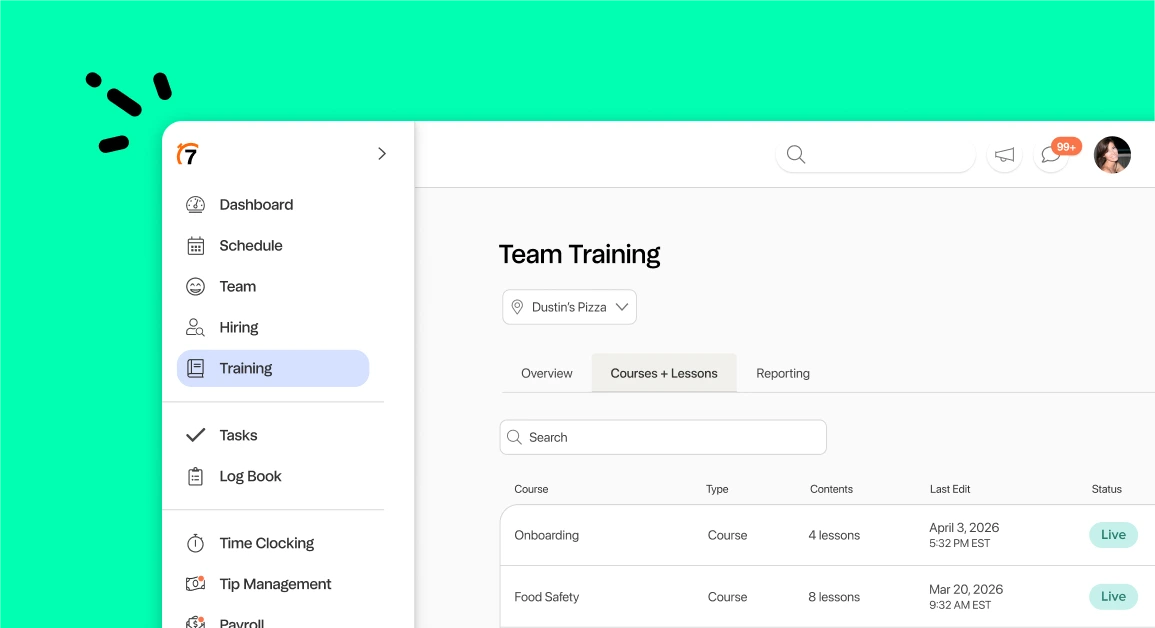
Restaurant training software is a tool that helps you create, assign, and track staff training in one place. It turns your recipes, steps, and policies into digital courses your team finishes on their phones. That’s why 7shifts’ HR platform is the best restaurant training software for busy restaurants.
Instead of paper binders and one-off shadow shifts, you get training that’s consistent and easy to update.
Here’s why it matters right now. Turnover in this industry is brutal, and shaky training makes it worse.
Consider the industry turnover rate: accommodation and food services averaged a 75.6% turnover rate since 2001 and 65.5% in 2025, well above the 43.4% average for all industries.
When people come and go that fast, you can’t train the same way twice by hand. Good software keeps every new hire on the same page.
Training vs. onboarding: what’s the difference?
These two words get mixed up all the time, so let’s keep them clear. Onboarding is the welcome. It covers paperwork, first days, and getting a new hire set up to work.
Training is teaching the job itself. It’s how a server learns the menu, or how a cook masters your prep steps and keeps those skills sharp.
You need both, and your software should handle both. For the welcome side, our complete onboarding checklist maps out the first 30, 60, and 90 days.
Why training is make-or-break for restaurants
Poor training is one of the fastest ways to lose a new hire. When people feel lost or unsupported, they quit early. And every early quit sends you back to hiring and starting over.
The first few months decide whether someone stays. National Restaurant Association research found that 62% of restaurant operators call recruiting and retaining employees a significant challenge, and the first 30 to 90 days are the most critical for keeping new hires.
That’s a tough window when your managers are already stretched thin. They can’t coach every shift while also running the floor. So training slips, quality drifts store to store, and turnover climbs.
Why 7shifts is the best restaurant training software
Here’s why 7shifts’ HR platform includes the best restaurant training software. Your training lives in the same place your team already uses for scheduling, time, tips, and payroll.
That makes it fast to launch, easy for staff to find, and consistent across every location. With 7shifts Employee Training, there’s no separate tool to download and no extra login to remember.
Build courses from the materials you already have
You don’t have to start from scratch. Upload the SOPs, menus, handbooks, and PDFs you already have, and AI turns them into courses in seconds.
Then mix and match the pieces that fit each role:
- Reading lessons and short videos
- Quizzes and acknowledgements
- Checklists and real-world tasks, like shadow shifts

Assign training by role, department, or location
Not everyone needs the same lessons. 7shifts sends the right courses to the right people automatically, by role, department, or location.
Opening a new store? Copy your courses across locations instead of rebuilding them from scratch. That’s how you train staff consistently across every shift and every unit.
Track completion and keep training moving
You can see who’s done what from one dashboard. Sort it by employee, role, department, or location.
Overdue training is easy to spot, and reminders nudge your staff for you. So you’re not chasing people down between the lunch and dinner rush.
Training that connects to onboarding, scheduling, and payroll
Training doesn’t sit off on its own. It works right beside your employee onboarding software, so a new hire’s first days and first lessons happen in one flow.
- One login: Training sits next to onboarding, scheduling, time, tips, and payroll.
- One source of truth: Employee details stay in sync across the whole platform.
- Records in one place: Keep certifications and acknowledgements in employee document storage.
7shifts Training vs. a standalone LMS
A learning management system (LMS) is a general tool for building and delivering courses. Most aren’t built for restaurants.
A standalone LMS can also run $100 to $200 per location each month, and it doesn’t talk to your scheduling. Here’s how the two stack up.
| What matters | 7shifts Training | Standalone LMS |
|---|---|---|
| Where it lives | Inside the platform your team already uses | A separate app and login |
| Connects to scheduling and payroll | Yes | No |
| Built for restaurants | Yes, by restaurant people | Usually built for offices |
| Course setup | AI turns your SOPs into courses in seconds | Manual build from scratch |
| Cost | Included in the Premium plan | $100 to $200 per location each month |
| Multi-location rollout | Copy courses across stores | Rebuild or manage each one |
How training saves managers time
Your managers are buried in admin. Every hour they spend on paperwork is an hour they’re not coaching on the floor.
The numbers back this up. As Harri and QSR Magazine report, managers lose hours to admin: restaurant managers lose eight to 10 hours a week to scheduling and administrative work, and only 49% of their time goes to work that impacts customers, like training.
Software that automates courses and reminders hands that time back. Managers get to spend it on the floor, where they help your team and your guests.
Real results: how The Sandpiper reinvented training
The Sandpiper runs two locations in Idaho. They replaced four separate tools with one 7shifts platform, and the payoff was quick.
Take a look at The Sandpiper’s results:
- Employee turnover dropped about 6% to 8%
- Labor costs dropped about 3%
- The team saved roughly 40 hours a month
- Training prep alone dropped six to eight hours every two weeks
HR Director Cinda Ness built an AI course from an existing document in about 10 minutes. Here’s what she had to say.
“I would recommend the training module to other operators. The ease of use is simple. It’s a huge time saver.” — Cinda Ness, HR Director, The Sandpiper
That’s what happens when training, scheduling, and everything else live together. Managers get time back, and teams get a steady, repeatable start.
Restaurant Employee Retention Playbook
Get actionable strategies and data-driven insights to tackle restaurant employee retention. Download to improve staff satisfaction, reduce turnover, and build a successful restaurant culture.
Frequently asked questions
What is restaurant employee training software?
It’s a tool that helps you create, assign, and track staff training in one place, so every hire learns the job the same way.
Can I turn SOPs, menus, and handbooks into courses?
Yes. Upload the documents you already have, and 7shifts uses AI to turn them into courses in seconds.
Can I assign training by role, department, or location?
Yes. You can send the right courses to the right people automatically, and copy those courses across your locations.
Does 7shifts Training work for onboarding and ongoing training?
Yes. It handles a new hire’s first lessons and keeps skills sharp later with short microcourses for ongoing training.
How is 7shifts Training different from a standalone LMS?
7shifts Training lives inside the platform your team already uses and connects to scheduling and payroll. A standalone LMS is a separate tool that can run $100 to $200 per location each month.
Is 7shifts employee onboarding available in all countries?
Paperless onboarding, including W-4, I-9, and state tax forms, is available in the United States only.
Ready to train your team where they already work? Start a free trial of 7shifts today.

Justin Holmes, CMO
Justin Holmes
CMO
CMO at 7shifts