
Restaurant Training Manual Templates
Get staff trained quicker and easier with the editable training manual template
- Keep all training information in one accessible place
- Create a single point of reference for staff to rely on for answers
- Customize the template to match your needs
 Keep all training information in one accessible place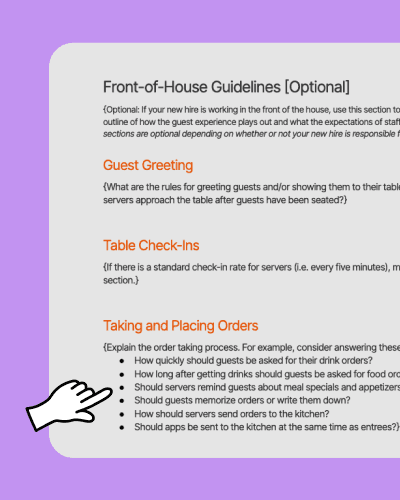

Employee Training Manual Template.xls

Have a single source of truth
If you want your employees to know the answer to a problem, refresh their skills, or get into the groove faster - having an up to date training manual is vital. This way each employee gets the same, crucial information about how your business operates and improves their onboarding speed.

Better Communication
When you onboard a new employee you’re not just giving them the ins and outs of your business, you’re setting them up for success. When it comes time for evaluations and reviews, coming from a common set of rules with a shared understanding of expectations can make all the difference.

Frequently asked questions
If you’ve ever trained someone “the usual way” only to realize they were taught something different on their next shift, you already know the problem: inconsistency. A training manual fixes that by turning tribal knowledge into a shared standard your whole team can follow. It also protects your managers’ time—because instead of answering the same questions over and over (“How do we comp this?” “What do we do if a guest says their steak is overcooked?”), you can point new hires to the same written answer every time.
It’s also one of the simplest ways to make your guest experience more reliable. When your hosts greet the same way, your servers follow the same steps of service, and your kitchen runs the same ticket and pickup routines, you cut down on avoidable mistakes. The result is fewer remakes, fewer refunds, and fewer “we don’t do it that way” moments between shifts.
Restaurant overview and culture
Start with the basics: who you are, what you serve, and what you’re trying to be known for. Include your mission, service style, and the behaviors you expect on the floor (for example: how you greet guests, how you handle feedback, and how you support teammates when someone’s in the weeds). This section sets the tone for every role—front and back of house.
Food safety and hygiene
Write down your non-negotiables for cleanliness, prep, and safe handling. Keep it practical: handwashing, glove use, labeling, holding temps, and what to do when something feels “off.” Requirements vary by location—confirm your local health department rules and any required certifications.
If you want a simple way to reinforce daily and weekly cleaning routines, pair your manual with a checklist like the Restaurant Cleaning Template.
Role-specific job duties (by position)
Break duties out by role (host, server, bartender, line cook, prep, dishwasher, shift lead, and so on). Don’t just list tasks—add the “how” and the “standard.” For example: “Run food within two minutes of expo call,” or “Refill waters before they’re empty.”
For front-of-house roles, it helps to include opening and closing duties in the same place so new hires don’t rely on memory. You can also link out to role checklists like the Server Duties Template.
POS system and ordering procedures
Document the ordering flow step-by-step: how to ring in modifiers, how to handle allergies, how to course tickets, and how to send or hold items. Add common mistakes you see (like missing temps, ringing sauces wrong, or forgetting seat numbers) and how you want them handled. This is one of the fastest ways to cut ticket errors during a new hire’s first 30 days.
Customer service standards and steps of service
Spell out your steps of service in plain language—greeting, drink order timing, check-backs, dessert offers, and payment. Include examples of what “good” looks like in your restaurant, not generic advice. If you run a full-service dining room, this is where you protect the experience that keeps guests coming back.
Dress code and conduct
Make the rules easy to follow: uniform details, grooming, jewelry, phone use, and punctuality expectations. If you have policies around harassment, discrimination, and respectful workplace behavior, include them here and be direct. If any policies are tied to state or local rules, confirm them with a professional.
Cash handling, comps, voids, and discounts
This section prevents expensive “I didn’t know” mistakes. Write down who can comp, how to get approval, what gets documented, and how tips get handled. If you do tip pooling, include how it works and where staff can find the current policy in writing.
Safety, emergencies, and incident reporting
Include what to do in common situations: guest injury, employee injury, broken glass, power outage, and disruptive guests. Add where to find first aid supplies, how to report an incident, and who to contact. Clear steps help your team act fast and stay calm when something goes wrong.
Start by listing every role in your restaurant and writing down what each person needs to know to be useful on day one. Then group that information into clear sections (culture, safety, role duties, POS, service standards, and house rules). If you don’t want to start from a blank page, use this template as your base, fill in your details, and keep it in a place your team can actually access—whether that’s a shared drive, a binder, or a link in your onboarding flow.
If you’re already managing schedules and new-hire paperwork digitally, it’s also worth connecting your manual to your onboarding process so new hires don’t miss it. For example, you can keep the manual alongside your employee onboarding steps, and then reinforce key standards during training shifts.
Yes. The template is fully editable, so you can tailor each section to match your menu, culture, and procedures. Open the document, replace the placeholder text in the curly brackets { } with your own content, and add or remove sections as needed. Whether you run a fast-casual spot or a full-service dining room, the template is meant to be a flexible starting point.
The restaurant training manual template is available as a Word document (.doc), which means you can open and edit it in Microsoft Word, Google Docs, or any compatible word processor. Once you’ve filled it in, you can save it as a PDF to share a print-ready version with your staff, or keep it as an editable file so you can update it as your restaurant evolves.
Review and update your training manual at least once a year, or any time you change your menu, switch POS systems, update health and safety procedures, or add a new role. Outdated manuals create confusion and can leave staff following steps that no longer apply. A quick quarterly check-in to flag what’s changed is a simple habit that keeps everyone aligned.
It depends on your operation, but for many restaurants, one master manual with role-specific sections is easier to maintain than multiple separate documents. You can keep universal information up front (culture, safety, conduct), then break into role sections for servers, hosts, line cooks, and more. Larger teams often split into separate FOH and BOH manuals to keep each document focused and easy to navigate.
Yes. Beyond a training manual, 7shifts supports employee onboarding and tools that help you keep team information organized, plus scheduling tools like restaurant scheduling that reduce time spent juggling shift changes and availability. The template is a free starting point, but pairing it with a consistent onboarding process makes training easier to run and easier for new hires to follow.