

Restaurant Schedule Template (Excel & Google Sheets)
Free Restaurant Work Schedule Template
- Quickly create your weekly schedules
- Assign roles and shift times
- Completely customizable to your restaurant
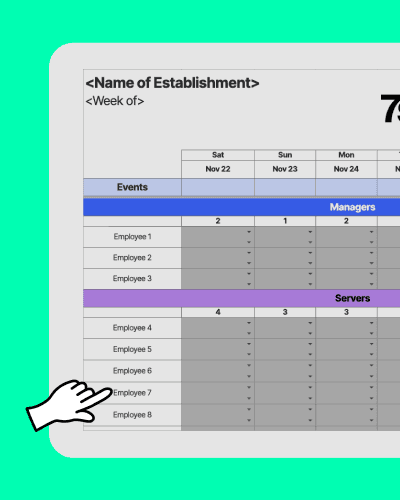

Restaurant Schedule Excel Template.xlsx
About the restaurant work schedule template
This free restaurant employee schedule template helps you build a weekly restaurant schedule fast—without rebuilding a spreadsheet from scratch every time. Use it to assign roles, shift times, and coverage for front and back of house, then share it with your team. If you’re still juggling paper sheets, this restaurant shift schedule template gives you a cleaner starting point. Or try a free trial of 7shifts today for even better scheduling.

How to use your restaurant schedule Excel template
Make well-executed schedules with this free Excel template.
1. Select which day of the week the schedule starts.
2. Add employees’ names.
3. Go to the ‘Shifts’ tab to customize the shift times and roles.
4. Select shift times and roles from the drop-down list for each employee.
5. Your schedule is ready to share with your team!
Or start a free trial of 7shifts for even better scheduling.

Tips for restaurant scheduling
How to build a restaurant schedule
Start with your week’s sales plan and labor target. Look at last week’s volume, any events, and what you can afford to staff before you assign a single shift.
List the shifts you need by role and station. Write out what “covered” means for your concept (hosts, servers, bartenders, line cooks, prep, dish) so you don’t miss a key position.
Collect availability, time-off requests, and training needs. Get this in writing early so you’re not rewriting the schedule the night before you post it.
Build the schedule around peak periods first. Fill your busiest services (Friday night, brunch, game days) before you plug in the slower shifts.
Assign people based on skill and consistency. Put your strongest staff on your highest-pressure shifts, and use slower shifts for training so the floor doesn’t get slammed.
Check total hours and overtime risk before you publish. Requirements vary by location—check your state and local regulations—then adjust early so you’re not stuck choosing between coverage and extra labor cost later.
Publish, then set one clear process for changes. Decide how callouts, swaps, and approvals work so you don’t end up managing the schedule in a dozen text threads.

How to optimize your restaurant schedules
If scheduling always turns into a late-night scramble, it’s usually a process problem. A few tips that work:
Set a cutoff for availability changes. If you build the schedule on Tuesday, don’t accept new availability on Monday night.
Schedule for the work around service. Opening side work, prep, and closing duties need labor, too—not just bodies on the floor at 7 p.m.
Build a callout plan into every day. Know who your on-call options are before the first “I’m sick” text hits.
Watch hours as you go, not after. Tracking hours while you schedule helps you avoid accidental overtime and surprise labor costs.
Keep notes for next week. Write down what went wrong (or right) so you’re not relying on memory during your next build.

Should I adjust schedules for front of house and back of house?
Yes—front of house (FOH) and back of house (BOH) don’t run on the same clock. FOH coverage usually rises and falls with guest counts, while BOH needs earlier starts for prep and later coverage for breakdown and closing.
Stagger start times. Bring BOH in early for prep, then stack FOH closer to the rush so you’re not paying for idle time.
Match skill to volume. Put your fastest expo or grill cook on your highest-ticket services, and protect newer staff with quieter shifts.
Plan handoffs. If BOH is cutting at the same time that FOH is still getting sat, service will feel rough no matter how good your team is.

How to automate your restaurant schedules
A spreadsheet can get the job done, but it doesn’t help when the schedule changes five times in a day. If you want fewer texts, fewer version-control headaches, and clearer accountability, scheduling software like 7shifts can help by keeping schedule changes, availability, and shift swaps in one place.









How does this free restaurant staff schedule compare to 7shifts?
Here is how a free Excel template stacks up against 7shifts.
 | Restaurant Schedule Template | |
| Easy schedule builder |  |  |
| Customizable to your restaurant | | |
| Free | | |
| Shareable with your team | | |
| Automatically assign checklist based on shifts or roles | |  |
| Add instructions for checklists | | |
| Get notified of task or checklist completion | | |
| Customize or change checklists on-the-go | | |
| Create different checklists for days, weeks, or months | | |
| View checklist completion rates | | |
| Free mobile apps | | |
| POS Integration for automatic sales tracking | | |
| Overtime alerts | | |
| Shift swapping | | |
| Communication tools (chat, announcement) | | |
| Sales and weather forecasts | | |
| Labor budgeting tool | | |
| Labor compliance tools | | |
“It is SO easy to use. It is intimidating at first familiarizing yourself with the platform but after a few minutes it feels so natural using it. I used to do all of my scheduling on an excel spreadsheet. It would take two or three times as long as it takes me now on 7shifts.”
Eddie Cuellar
Restaurant owner, Tower Burger


“I was originally drawn to 7shifts because of their simple and easy interface for scheduling, but when I found out they also did payroll, it was a no-brainer. My employees onboarded via the 7shifts mobile app in 10 minutes and I'm already saving hours of time when it comes to processing payroll. Total game changer.”
Fahad Hanif
Owner/Operator, Halal Guys

“If you're a restaurant professional, this is a mandate. If this is a hobby for you, by all means, use something else. Use Excel, use post-it notes if you write it down. But if you're a professional and this is your career and your actual goal is to earn profit for your business, then there's no viable solution or anything that would make sense other than this. There just isn't.”
Mike Bausch
Owner, Andolini's


Find out why 1.5 million restaurant professionals love 7shifts

Restaurant scheduling FAQs
Yes, the restaurant schedule template is completely free to download — no trial signup, no strings attached. It’s available as a Google Sheet or Excel file that you can customize with your own employee names, roles, and shift times. If you later decide you want automated scheduling, overtime alerts, or mobile access for your team, you can start a free trial of 7shifts.
With the Excel template, you can share the schedule by emailing the file, printing it out, or uploading it to a shared drive like Google Drive or Dropbox. The downside is that every time you make a change, you have to re-share the updated version — and there’s no guarantee your staff will see it. With 7shifts, schedule updates are pushed directly to your team’s phones the moment you publish, so there’s no confusion about who has the latest version.
Yes. The template includes a “Shifts” tab where you can customize shift times and roles to match your restaurant’s structure — whether that’s front of house, back of house, bar, or any other department. You can create separate shift labels for servers, line cooks, hosts, and bartenders, then assign them from a drop-down menu. For restaurants with more complex role structures or multiple locations, 7shifts lets you manage all of that in one place with role-based scheduling and location-level visibility.
Most managers can put together a basic weekly schedule in 30–60 minutes using the template, depending on how many employees they’re scheduling. That said, the time adds up — if you’re spending an hour every week on scheduling, that’s more than 50 hours a year just on building the schedule, before you factor in changes, swaps, and call-outs. Restaurant owners who switch to 7shifts report cutting their scheduling time greatly, which frees up time for the parts of the job that actually need a manager’s attention.
A weekly schedule template covers a single seven-day period and is the most common format for restaurant scheduling because it’s easier to adjust for fluctuating staff availability and sales volume. A monthly template gives you a higher-level view of the whole month, which is useful for planning around events, holidays, or known busy periods. Most restaurant operators use a weekly template for day-to-day scheduling and a monthly view for longer-term planning. 7shifts offers both views within the platform, so you can switch between them without rebuilding anything.
Free Restaurant Management Templates
See all templates
Weekly Work Schedule Template
Download the best weekly work schedule template for excel-file to help create your staff work schedules.
Download now
Monthly Work Schedule Template
Download the best monthly work schedule template for excel-file to help create your staff work schedules.
Download now

Employee Training Manual Template
Get the free restaurant employee training manual to help you and your employees stay accountable.
Download now
Labor Cost Calculator Template
Your free restaurant labor schedule template to track hours worked by your restaurant staff.
Download now