

Reduce Expenses with a Free Cost Calculator
Free restaurant food cost calculator for Excel
- See where each food dollar goes
- Calculate total costs and expenses quickly
- Customize it for your restaurant menu
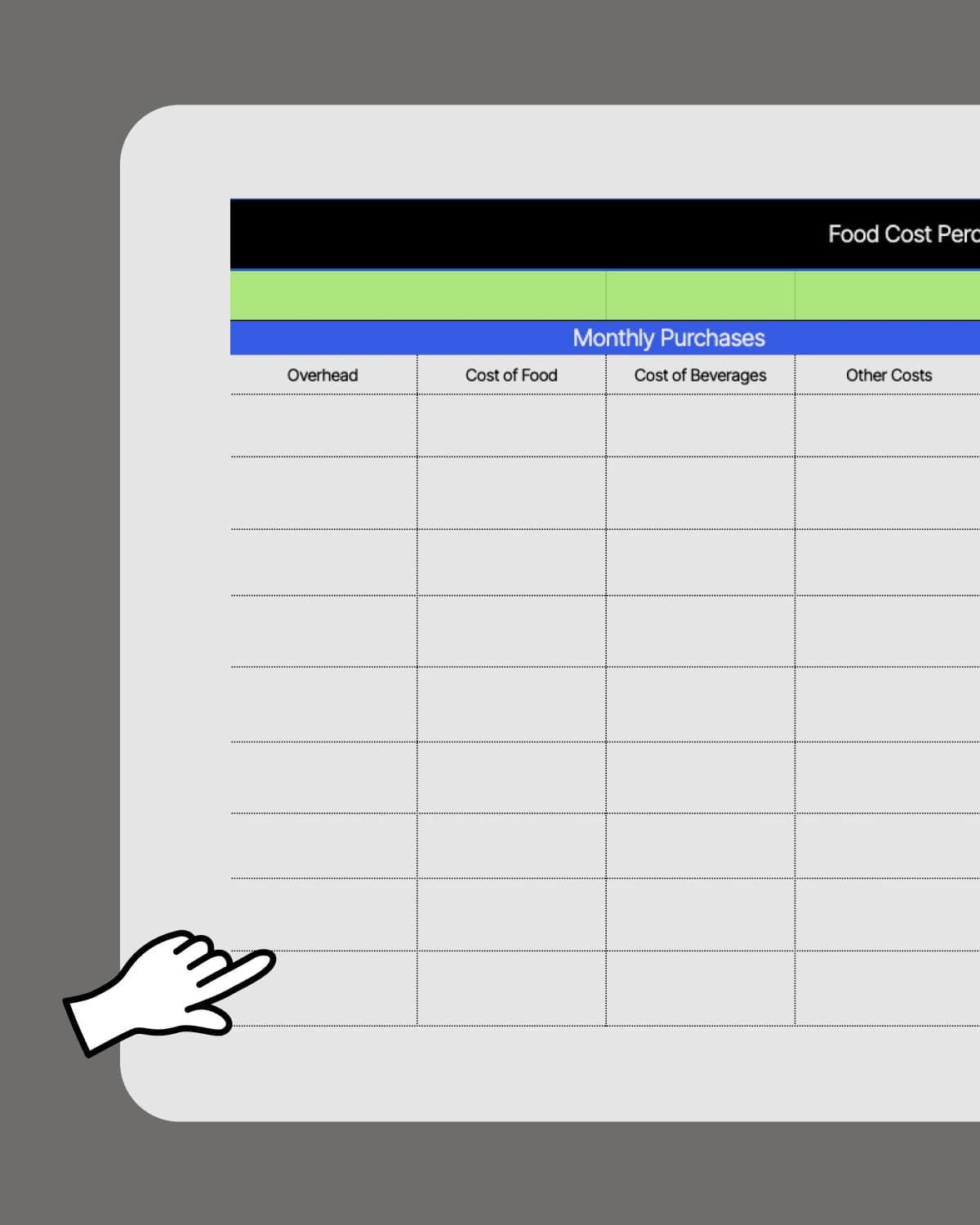

Food Cost Percentage Template.xlsx
How to use our food cost calculator
1. List current food, beverage, and overhead costs.
2. Add estimated monthly purchases.
3. Enter total revenue for the month.
4. See food cost percentage.


What is a restaurant food cost template?
A restaurant food cost template is a spreadsheet that calculates your food cost percentage by comparing what you spend on ingredients to what you earn in food sales. - What it tracks: Ingredient spend, sales, and your resulting food cost %. - What it helps you do: Spot waste, portion creep, and price issues before they hit your margins. - When to use it: Weekly or monthly, especially when supplier pricing changes.

Why do restaurants need a food costing calculator?
A food cost template shows what each dish truly costs, so you can price your menu with confidence. It’s one of the fastest ways to protect your margins when food prices change. - Menu pricing: Raise prices with proof, not guesswork. - Portion control: Catch over-portioning before it becomes the norm. - Purchasing decisions: See which ingredients are dragging down profitability.
That is just one piece of the puzzle










Track all your costs in one place
Keep food costs, overhead, and sales in one spreadsheet so you can see the full picture.

Instant food cost calculation
Enter your numbers and the template calculates your food cost percentage automatically.

Compare actual vs. projected costs
If you forecast costs but don’t compare them to actual numbers, you miss out on big insights. Use forecasts and actuals side-by-side to spot gaps early.

Better control with monthly food cost calculation
Review your food cost calculation every month to see changes in spending. Regular check-ins lead to a healthier bottom line.
What makes the 7shifts cost calculator different?
 | Food Cost Template | |
| Easy schedule builder |  |  |
| Customizable to your restaurant | | |
| Free | | |
| Free mobile apps | |  |
| Communication tools (chat, announcement) | | |
| Automatic sales and labor reporting | | |
| POS Integration for automatic sales tracking | | |
| Easy manager note taking | | |
| Labor compliance tools | | |
How to customize the template for each recipe
Recipe costing shows your true margin per dish, not just your overall food spend.
1. Create sheets for each recipe: Make a separate tab for each menu item.
2. List all ingredients: Include every component, even oils, sauces, and garnishes.
3. Add columns for details: Quantity, unit, unit price, and total cost.
4. Include portion size: Track how much goes into one serving.
5. Set up cost-per-serving formulas: Divide total recipe cost by the number of servings.
“It is SO easy to use. It is intimidating at first familiarizing yourself with the platform but after a few minutes it feels so natural using it. I used to do all of my scheduling on an excel spreadsheet. It would take two or three times as long as it takes me now on 7shifts.”
Eddie Cuellar
Restaurant owner, Tower Burger


“I was originally drawn to 7shifts because of their simple and easy interface for scheduling, but when I found out they also did payroll, it was a no-brainer. My employees onboarded via the 7shifts mobile app in 10 minutes and I'm already saving hours of time when it comes to processing payroll. Total game changer.”
Fahad Hanif
Owner/Operator, Halal Guys

“If you're a restaurant professional, this is a mandate. If this is a hobby for you, by all means, use something else. Use Excel, use post-it notes if you write it down. But if you're a professional and this is your career and your actual goal is to earn profit for your business, then there's no viable solution or anything that would make sense other than this. There just isn't.”
Mike Bausch
Owner, Andolini's


Ideal food cost percentages for each type of restaurant

Quick service restaurants (18-22%)
Quick service restaurants have lower food costs, around 18% to 22%, with their simpler menus. Fewer offerings and quick food prep make it easier to predict and control ingredient costs, especially with a food cost calculator.

Fast casual restaurants (28-30%)
Most fast casual restaurants aim for a food cost percentage of about 28‑30%. Update recipe details and overhead weekly, then review your calculation to spot any rising costs.

Full-service restaurants (30-40%+)
Upscale places tend to have higher food cost percentages, as much as 40% or more, due to premium products. Factor in fancy ingredients, labor, and plating when you calculate total costs in your calculator.
Find out why 1.5 million restaurant professionals love 7shifts
Calculating food costs is just one piece of the puzzle
While a food cost calculator can show you basic numbers, restaurants need more than just food cost calculation to thrive. With 7shifts, you get an all-in-one platform that goes beyond cost analysis.

All-in-one restaurant solution
7shifts does more than just help you calculate and reduce costs. Our restaurant software also manages schedules and improves team communication, making it easy to run your restaurant from top to bottom.

Holistic cost analysis for modern restaurants
Simple costing alone won’t help you adapt and thrive in a fast-changing industry. 7shifts gives you deeper insight into your menu pricing, overhead, and inventory through advanced analytics.

Grow your business without additional costs
Our platform scales to fit your needs, handling more than just food expenses. As your restaurant grows, 7shifts grow with you, so you won’t have to worry about additional software or complicated setups.
Calculate recipe costs for every dish
Calculating the recipe cost for each dish helps you see exactly how every ingredient affects your bottom line. With a cost calculator, restaurants can check for hidden expenses that weren’t accounted for in the pricing.
Free Restaurant Management Templates
See all templates

Restaurant Schedule Template
Create staff schedules in less time with this free restaurant staff schedule template
Download now
Tip Pooling Calculator
Dive into tip pooling with this free Excel calculator
Download now

Employee Training Manual
Get staff trained quicker and easier with the editable training manual template
Download now
Manager Log Book
Keep track of every shift with the manager log book template
Download now

Frequently Asked Questions
Everything you need to know about food cost calculation
Yes — the template is fully customizable, so you can duplicate it for each location and track food costs separately across your operation. If you run more than one restaurant, keeping separate tabs or files per location helps you compare performance and spot which location is running lean and which one needs attention. For operators managing two or more locations, pairing the template with 7shifts’ labor reporting gives you a more complete view of total operating costs.
To find the cost per serving for a dish, add up the cost of every ingredient that goes into one portion, then divide the total recipe cost by the number of servings it yields. For example, if a batch of soup costs $30 to make and yields 10 bowls, your cost per serving is $3.00. Don’t forget to include small-cost items like oils, garnishes, and sauces — they add up faster than most operators expect, especially at high volume.
If your food cost percentage is consistently above your target range — and your menu prices haven’t changed — it’s a signal that something is off. Common culprits include portion creep (staff plating more than the recipe calls for), supplier price increases that haven’t been passed on to customers, or waste and spoilage that isn’t being tracked. Running your food cost calculation weekly and comparing it to the previous period is the fastest way to catch a problem early, before it compounds into a bigger margin hit.
7shifts’ spreadsheet template is a quick, organized way to keep track of all your food costs, overhead, and sales in one place. The built-in cost calculator saves time and reduces errors, letting you compare spending against your goals instantly. With easy-to-use formulas, you’ll see your food cost calculation at a glance and keep your bottom line in check.
Yes. 7shifts’ recipe cost calculator lets you update the cost of food or beverages to reflect new totals and adjust your pricing accordingly. That means you’ll always have an accurate view of recipe expenses in your spreadsheet
Some ingredients change prices more often than others. Produce, meat, and dairy can have big price swings depending on the season or market conditions. By updating your calculator regularly, you’ll always know exactly how much each dish costs to make.
Beyond ingredient prices, consider waste and spoilage, preparation time, delivery fees, and storage expenses. These often-overlooked expenses can significantly impact your overall food cost percentage. Tracking these with 7shifts’ food cost calculator makes it easy to see where you might cut waste.
You can reduce them by implementing stricter portion control and inventory management. Another strategy is to negotiate better rates with suppliers or explore bulk purchasing options.
To calculate your food cost percentage, divide your total food costs by your total food sales, then multiply by 100. The formula looks like this: Food Cost Percentage = (Total Food Costs ÷ Total Food Sales) × 100. For example, if you spent $3,000 on ingredients and brought in $10,000 in food sales, your food cost percentage is 30% — meaning 30 cents of every dollar in food revenue goes toward ingredients. Tracking this number weekly or monthly helps you catch rising costs before they eat into your margins.
A restaurant food cost spreadsheet should include your beginning and ending inventory values, total ingredient purchases for the period, and your total food sales. From those three inputs, you can calculate your actual food cost percentage for any given week or month. For a more detailed view, add columns for individual ingredient costs, portion sizes, and recipe-level cost per serving — this helps you see exactly which menu items are dragging down your margins. Including overhead costs like delivery fees, storage, and waste gives you the most accurate picture of your true food spend.
Food cost is the raw dollar amount you spend on ingredients. Food cost percentage is that number expressed as a share of your total food sales — so it’s the more useful metric for day-to-day decisions. For example, spending $4,000 on food sounds different depending on whether you did $8,000 or $20,000 in sales that week. Tracking the percentage, not just the dollar amount, tells you whether your margins are healthy regardless of how busy you were.
It means $0.30 of every $1.00 in food sales goes to ingredients. Many restaurants target roughly 28–35% depending on concept and pricing.
Many restaurants aim for 28–35%, but quick-service can be lower and fine dining can be higher. Your “good” number is the one that still covers labor and overhead with room for profit.
Update your food cost calculator at least once a month — weekly if your ingredient prices change often or your menu is seasonal. Produce, meat, and dairy prices can swing significantly based on market conditions, and a number that was accurate in January may be off by March. The more consistently you update it, the faster you’ll catch cost creep before it shows up as a surprise on your P&L.