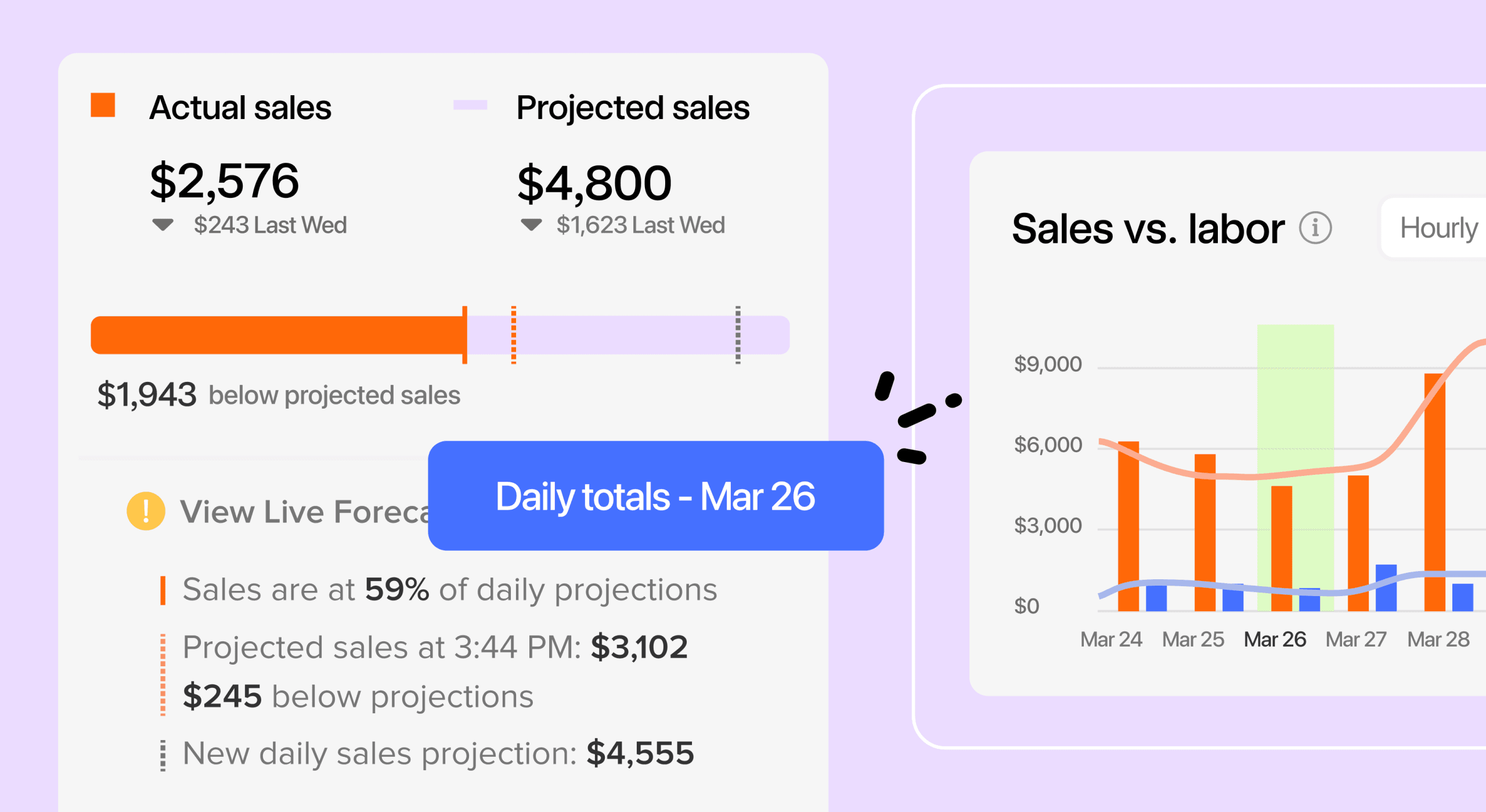
HungerRush knows what every unit sold tonight. But at many franchises, the schedule, tip pool, and payroll live in separate tools that can’t see those numbers. That gap costs managers hours and lets labor costs drift.
HungerRush is a point of sale (POS) platform, the tool that rings up orders and payments. It’s built for different restaurant types, and its HungerRush company overview says “16,000+ locations trust HungerRush.”
If you run HungerRush POS across several units, you need HR software for franchises that reads those numbers directly. Here’s what syncs with 7shifts, how setup works, and what to watch for before launch.
Why 7shifts is the best HR software for HungerRush franchises
7shifts is the best HR software for franchises using HungerRush because it’s built only for restaurants and connects directly to HungerRush POS. It syncs actual sales, labor, and team data. It also pushes shifts back to HungerRush to block unscheduled clock-ins, and tip syncing from HungerRush into tip pools is coming soon.
7shifts is the restaurant HR platform with franchise roots. Founder Jordan Boesch built his first scheduling tool for his father’s Quiznos franchises, and 7shifts was founded in 2014. Today, 55,000+ restaurants use it.
- Restaurant-only focus: Every tool is built around restaurant shifts, tips, and hourly teams.
- Live HungerRush data: Sales, labor, and team data sync from HungerRush, so schedules reflect what each store sells.
- Franchise fit: You connect each 7shifts company account, then repeat the same setup rules at every unit.
The 7shifts HungerRush integration guide lists every setting covered below.
“Point of sale is the thing that’s running the restaurant, especially on the floor. It’s the source of truth for what sales happen and when, when someone is clocking in and out, and the tips made during that time,” says Julianne Lee, senior product manager at 7shifts.
2026 Labor Costs Playbook
Increase your bottom line with insights from over 500 restaurant pros—learn the true cost of employee turnover, the best way to manage labor costs, and proven strategies to protect profits.
The real cost of disconnected tools across franchise units
Data silos happen when information gets stuck in separate tools that don’t share it. For a HungerRush franchisee, sales sit in the POS while the schedule and payroll sit somewhere else.
So managers re-key hours by hand. Labor drifts over target, and nobody notices until the week is over.
“Without a connected point of sale, you won’t find your labor cost until much later. It could take multiple weeks before you realize, ‘Oh my gosh, I added too many people during a week when it was really slow on sales,’” says Lee.
The margin for error is thin. Among all limited-service respondents, salaries and wages (including benefits) were a median of 31.7% of sales in 2024, per the NRA operations data abstract.
Profits are tight, too. In the NRA 2026 State of the Industry data, 42% of operators said their restaurants weren’t profitable in 2025. They also said they had limited ability to raise menu prices.
Growth multiplies the problem. The IFA 2026 franchising outlook projects franchise establishments in the United States will grow from 832,521 to 845,000 units, an increase of 1.5%. That forecast covers every franchised industry, and each new unit is one more store to keep in sync.
How the 7shifts and HungerRush integration works
The integration moves data in both directions. HungerRush sends sales, labor, and punches to 7shifts, with tips coming soon. 7shifts sends shifts back to HungerRush.
“7shifts is in the middle of this relationship. The point of sale sends the information over to 7shifts, and we take that sales data and the labor information to look at who is working on what days and help optimize overall labor against the sales that are actually happening,” says Lee.
| Data from HungerRush | What 7shifts does with it | Setting/notes |
|---|---|---|
| Actual sales | Shows real-time sales and fills in Projected Sales for scheduling | On by default. Projections take about 1–2 weeks to appear. |
| Actual labor | Compares Sales vs. Labor on the Dashboard | Updates from the day you turn it on. |
| Tips | Coming soon: will send CC tips, auto-gratuity, cash tips, and declared tips into Tip Pooling | Coming soon. Once available, configure tip settings after the first sync. |
| Shifts (sent from 7shifts to HungerRush) | Lets HungerRush check the schedule at clock-in for Schedule Enforcement | Unscheduled staff need a manager override. |
| Punches | Powers Auto-Shift Flags (when enabled) and the Warnings tab, which flags punches missing a role | Edit punches in HungerRush unless 3rd Party Punches is on. |
Real-time sales and forecasting
Real-time sales turn on by default once the integration is active. 7shifts uses those Actual Sales to fill in Projected Sales, so you can build schedules around expected demand.
Projections take about 1–2 weeks to appear and cover up to four weeks ahead. They get more accurate as more data comes in. Need them sooner? Manually import hourly sales each day or individual receipts.
Sales show up in four places: the Dashboard, Manager Log Book, Actuals Report, and Labor Budget Tool. The Labor Budget Tool uses past sales to insert projections when you build future schedules. Learn more about why you should connect your POS to scheduling.
“Point of sale really marries all that sales information and helps restaurants understand their future forecast and the number of people that need to work on the floor,” says Lee.
Actual labor and Auto-Shift Flags
With actual labor on, HungerRush labor costs pull into the 7shifts Dashboard as Sales vs. Labor. Numbers update starting the day you turn it on. You can dig deeper with real-time labor reports.
Make time punch edits in HungerRush to avoid data conflicts. If the 3rd Party Punches setting is on, edit punches in 7shifts instead.
Shift Flags mark shifts as Sick, No-show, Late, Called in, or Called off. With Auto-Shift Flags on, 7shifts can flag late arrivals and no-shows from HungerRush punch data. Restaurants using 7shifts as its HR platform reduce labor costs up to 3%.
“Our schedule really shapes what labor costs will be, based on the information being pulled from our different partners,” says Lee.
Stop unscheduled clock-ins with Schedule Enforcement
Schedule Enforcement is a setting that lets staff clock in at HungerRush only when they’re scheduled to work. It closes the gap where early or unplanned punches add hours nobody budgeted.
Shifts sync automatically from 7shifts to HungerRush. When an employee tries to clock in, HungerRush checks the schedule.
If they’re scheduled, they clock in as normal. If they’re not, HungerRush won’t let them clock in unless a manager overrides.
For franchise groups, the same rule applies at every store. It doesn’t matter which manager is on that night. Clock-in enforcement with 7shifts can prevent $508 per month in unbudgeted labor.
Automated tip pools for HungerRush tips (coming soon)
Tip support for HungerRush is coming soon. Here’s how it’s designed to work.
Tip pooling means collecting tips from a shift and splitting them among eligible staff with a set formula. Doing that math by hand from POS reports eats into a manager’s night.
The HungerRush integration will support four tip sources: CC (credit card) tips, auto-gratuity, cash tips, and declared tips. Those tips will be collected for 7shifts Tip Pooling. From there, you’ll be able to set automated tip pooling rules by hours worked, points, or percentages.
When tips launch, configure your tip settings after the first sync, so 7shifts recognizes every tip source. To include tips in reports and payroll, you’ll also need to set up tip calculation settings.
“They can manage all of their tips in one single system,” says Lee.
Know the federal rule, too. Under the Fair Labor Standards Act (FLSA), employers can’t keep any portion of employees’ tips for any purpose. The U.S. Department of Labor (DOL) spells this out in its DOL tipped employees fact sheet. That covers tips taken directly or through a tip pool, even when an employer takes a tip credit.
State laws can be stricter, so check your state rules before you set up a pool. 7shifts helps you run the pool, but compliance stays the employer’s responsibility.
Catch payroll problems before they cost you
Once HungerRush labor syncs, a Warnings tab appears when you review your current pay period. Find it under Time Clocking > Pay Periods > Warnings. It flags punches missing a role that may need attention before you run payroll.
You can fix most issues right in that tab. You can still close the pay period with some warnings open.
Clean data depends on setup: employees need to be mapped, and punches need roles and wages. With those in place, data can move into 7shifts Payroll, our payroll software built for restuarants, or into external exports.
“That data then flows into several 7shifts products, like 7shifts Payroll, where you know exactly when someone worked and how much they should get paid,” says Lee.
Pay errors are expensive. In fiscal year 2025, the DOL’s Wage and Hour Division recorded 4,088 compliance actions in food services. Those actions covered $42,663,929 in back wages for 30,029 employees, per its DOL food services back wages data.
Standardize every HungerRush location in your franchise
The setup choices you make at your first store become the template for every unit after it. Get them right once, then repeat them everywhere. For more on multi-unit setups, see our guide to software built for franchise groups.
“7shifts has the ability for an enterprise or corporation to see all of their labor costs in one single view,” says Lee.
Set the same rules at every unit
Set the same time zone and workday hours in 7shifts and HungerRush at every unit. The workday must run 5:00 a.m. to 5:00 a.m. in both.
Close every receipt at the end of the night. Unclosed receipts can change receipt dates when payments clear the next day, which throws off sales.
Use consistent roles at every store, so the Warnings tab stays clean before payroll. Then check employee mapping, which links each person’s HungerRush profile to the same person in 7shifts.
“The most common thing operators get wrong is employee mapping. On the point of sale there could be an employee set up with one name, and in 7shifts they’ve also put in a middle name, so there are mishaps in making sure the right person is mapped,” says Lee.
Give franchise owners one view
“Franchise owners don’t want to worry too much once everything is set up. They can go into 7shifts and see the labor forecast and the sales forecast to identify the best schedule to create,” says Lee.
One setup note: each 7shifts company account connects to HungerRush one at a time. If your franchise group runs several company accounts, repeat the setup steps for each one.
How to set up the HungerRush integration
HungerRush manages setup and configuration. For help, contact HungerRush Support at support@hungerrush.com or 1-281-971-2500. Access to the integration may require an upgrade from your existing 7shifts plan.
- Watch for an email from HungerRush’s Onboarding team with a link to get started.
- Log in to 7shifts as an Admin when prompted.
- Pick one company from the dropdown if your account has several. Only one account can be integrated at a time.
- Click Submit.
- Grant access between HungerRush and 7shifts.
- Copy your unique token and share it with your HungerRush Onboarding contact. You can also find your access token under Settings > Developer Tools.
- Repeat these steps for each additional account.
Previous sales can take a few hours to show up, so check back if they’re missing.
“Once you set up, we pull in the name of your restaurant and which employees work there,” says Lee.
Know the limits before you launch
Plan for these four limits before your first pay period.
- Breaks: Breaks aren’t supported with the HungerRush integration. Track them in 7punches, the 7shifts time clock.
- Punch edits: Make punch edits in HungerRush. Edit them in 7shifts only if 3rd Party Punches is on.
- Tips: HungerRush tip syncing, including tip pooling and tips in payroll, is coming soon.
- Forecasts: Sales projections need about 1–2 weeks of data to appear. Import sales manually if you need them sooner.
FAQs about 7shifts and HungerRush
Does 7shifts integrate with HungerRush POS?
Yes. HungerRush integrates with 7shifts to sync actual sales, labor, and team data across both platforms.
What data syncs between HungerRush and 7shifts?
HungerRush sends actual sales, actual labor, and punches to 7shifts. Tip syncing is coming soon. 7shifts sends shifts back to HungerRush for Schedule Enforcement.
Who sets up the HungerRush integration?
HungerRush manages setup and configuration, and HungerRush Support handles setup questions.
How long until sales forecasts show up?
Sales projections take about 1–2 weeks after activation to appear. Manual sales imports can speed that up.
Can employees clock in at HungerRush when they’re not scheduled?
Not with Schedule Enforcement on. HungerRush blocks unscheduled clock-ins unless a manager overrides.
Does HungerRush tip data sync to 7shifts?
Tip syncing is coming soon. Once available, CC tips, auto-gratuity, cash tips, and declared tips will feed 7shifts Tip Pooling.
Run every HungerRush unit from one restaurant HR platform
With 7shifts and HungerRush connected, each unit gets live sales, actual labor, and Schedule Enforcement, with tip pools coming soon. You also catch payroll data issues before the pay period closes.
“A restaurant shouldn’t have to worry about what’s happening behind the scenes. They should only focus on what’s going to happen next week or tomorrow,” says Lee.
See all 7shifts POS and payroll integrations to plan the rest of your setup.

Justin Holmes, CMO
Justin Holmes
CMO
CMO at 7shifts