

Free Restaurant Comment Card Template
Get honest reviews from your customers with this free comment card template
- Hear what customers love about your restaurant
- Spotlight areas for improvement including food, service, decor, layout and more!
- Gather valuable feedback to make your restaurant better
 Hear what customers love about your restaurant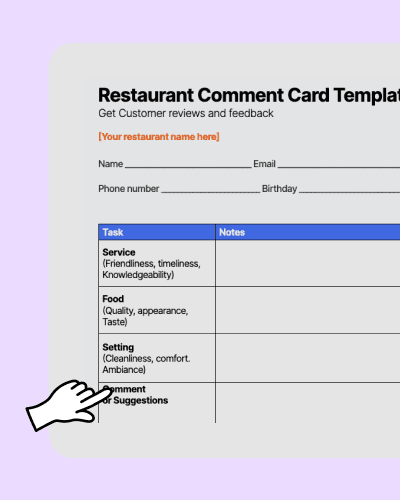

Restaurant Comment Card Template.docx
How to use your restaurant comment card template
Start gathering feedback today with this customizable card.
1. Open the template and edit to suit your restaurant’s needs.
2. Print out the template to hand out to customers.
3. Take time to review feedback your receive and action any areas of improvement.


What is the purpose of a comment card?
Ever want to get into your customer’s head? Hear unbiased opinions on how your restaurant, staff, and food is measuring up? Then welcome the comment card through your doors. Usually the size of a postcard, they’re handed out to guests to collect thoughts on everything to do with the restaurant experience.

What are comment card best practices?
Comment cards are best given to guests along with the check, so they can give payment information and fill it out at the end of their meal. You shouldn’t force guests to give feedback, however. Offer them the option to provide feedback if they wish. You may also choose to offer a way for guests to give feedback online through services.
The comment cards are just the beginning
A powerful team management platform like 7shifts can help you keep track of costs, unlock efficiencies, and take your tip pool to the next level.








“It is SO easy to use. It is intimidating at first familiarizing yourself with the platform but after a few minutes it feels so natural using it. I used to do all of my scheduling on an excel spreadsheet. It would take two or three times as long as it takes me now on 7shifts.”

Eddie Cuellar
Restaurant owner, Tower Burger


“I was originally drawn to 7shifts because of their simple and easy interface for scheduling, but when I found out they also did payroll, it was a no-brainer. My employees onboarded via the 7shifts mobile app in 10 minutes and I'm already saving hours of time when it comes to processing payroll. Total game changer.”
Fahad Hanif
Owner/Operator, Halal Guys

“If you're a restaurant professional, this is a mandate. If this is a hobby for you, by all means, use something else. Use Excel, use post-it notes if you write it down. But if you're a professional and this is your career and your actual goal is to earn profit for your business, then there's no viable solution or anything that would make sense other than this. There just isn't.”
Mike Bausch
Owner, Andolini's


Find out why 1.5 million restaurant professionals love 7shifts

FAQs on customer comment cards
Most restaurants get the highest completion rates when you hand comment cards out with the check. Guests are already wrapping up, and they’ve got a minute to rate the meal while it’s still fresh in their mind. Keep it low-pressure: don’t ask them to fill it out at the table while you’re waiting, and don’t make it feel like homework. You can also offer a QR code option for guests who’d rather share feedback online, but paper cards still work well in full-service restaurants where people linger after they pay.
Yes — comment cards are still one of the most effective ways to collect honest, in-the-moment feedback from guests, especially from customers who wouldn’t bother leaving an online review. Research consistently shows that only a small fraction of dissatisfied customers complain directly to staff, which means comment cards surface problems you’d otherwise never hear about. They’re also faster to act on than online reviews: a manager can read a stack of comment cards at the end of a shift and address issues the same day. For restaurants that want to improve without waiting for a Yelp review to tell them something’s wrong, comment cards are a practical, low-cost tool.
The most effective approach is to review comment cards at the end of every shift and look for patterns — not just one-off complaints. If three guests in a week mention that their food arrived cold, that’s a kitchen workflow issue worth investigating, not a fluke. Assign one manager to own the feedback review process and log recurring themes in a simple spreadsheet or your Manager Log Book so you can track whether changes are making a difference. Share positive feedback with your team, too — recognizing staff by name when a guest calls them out by name is one of the easiest ways to boost morale and reinforce the behaviors you want to see more of.
Comment cards don’t just tell you what guests think — they show you where the shift broke down. If feedback keeps calling out long waits on Saturdays, you may have a scheduling problem (not a service attitude problem). If one server’s name shows up in positive comments week after week, that’s someone you can build a training shift around. If the same complaint hits multiple stations, it’s a coaching topic for pre-shift. You can track this by hand, but it’s easier when your schedule, shift notes, and payroll live in the same place. For example, scheduling and payroll tools like 7shifts can help you spot patterns faster, then adjust staffing before those issues turn into public reviews. You can also pair this with a restaurant schedule template if you’re still building schedules in spreadsheets.
A comment card is a private, in-house feedback tool — only you and your team see the responses. An online review on Google or Yelp is public and permanent. Comment cards give you a chance to catch problems before they become public complaints, and they tend to generate more candid feedback because guests aren’t performing for an audience. Think of them as your early warning system.
Keep it to one side of a postcard-sized card — roughly five to seven questions maximum. Anything longer and most guests won’t bother filling it out. Use a mix of rating scales (quick to complete) and one or two short-answer fields for guests who want to say more. The template included on this page is already sized and formatted to hit that sweet spot.
You can, but you don’t have to. A small incentive — like entry into a monthly prize draw or a discount on their next visit — can increase response rates, especially in slower periods. Just be careful: incentives can sometimes skew feedback toward the positive, since guests may feel obligated to say something nice in exchange for a reward. If your goal is honest feedback, a simple, no-pressure ask alongside the check often works just as well.
Absolutely. Many restaurants use QR codes on the table or on the check to direct guests to a short online survey — tools like Google Forms or Typeform work well for this. Digital comment cards make it easier to track trends over time since responses are automatically logged. That said, paper cards still tend to get higher completion rates in full-service restaurants, where guests have a few minutes to spare at the end of their meal. A hybrid approach — paper cards at the table, with a QR code option for guests who prefer digital — gives you the best of both.
Free Restaurant Management Templates
See all templates

Tip Pooling Template
Download the free excel tip pooling calculator to help determine and distribute tips to your employees using tip pools.
Download now
Food Cost Percentage Template
Use the food cost template to control costs and improve restaurant profits.
Download now
Sales Dashboard Template
Get the sales dashboard template to help you track restaurant sales & labor.
Download now
Restaurant Schedule Template
Download the best restaurant excel-file schedule template to help create your staff work schedules.
Download now